

Technology is constantly evolving, and businesses need reliable CRM systems to manage customer relationships, streamline operations, and improve productivity. Regular software updates help organisations maintain system efficiency while adapting to changing business requirements. For companies using Oracle Siebel CRM, the Siebel CRM 26.10 update introduces several enhancements worth exploring.
This release brings improvements to Siebel Product Configurator and the Siebel Monitoring and Diagnostic Console (SMDC). These features aim to simplify product configuration, improve system visibility, and support more efficient CRM management. However, upgrading to a new CRM version requires careful planning. From checking compatibility to testing existing integrations, businesses must consider several factors before making the transition. Let’s explore what organisations should know before upgrading.

Understand the New Features
Before upgrading, businesses should understand what Siebel CRM 26.10 offers and how its enhancements can support their operations. One notable improvement is API-Driven UI Property Management in Siebel Product Configurator. It allows businesses to manage and publish configurable product interface properties through design-time APIs. This can simplify product updates and help maintain consistency across digital platforms.
Another important addition is the Siebel Monitoring and Diagnostic Console (SMDC), which provides centralised visibility into system health, server performance, and application activity. Understanding these capabilities helps organisations identify which improvements are relevant to their business requirements.
Evaluate Your Existing CRM Environment
Every organisation has a different CRM setup. Some rely on customised workflows, while others use multiple integrations and specialised configurations. Before upgrading, review your existing Siebel CRM environment, including databases, server components, custom scripts, workflows, and third-party applications. Consider these questions:
A detailed assessment helps identify potential challenges before the upgrade begins.
Check Compatibility and Technical Requirements
Compatibility is an important consideration during any enterprise software upgrade. Businesses should review Oracle’s latest installation documentation and verify supported operating systems, databases, browsers, and connected technologies.
IT teams should also examine installation and deployment changes introduced in Siebel CRM 26.10. For example, the Gateway TLS port is now configured through the Gateway profile in Siebel Management Console during a new Gateway installation. Ensuring that all components meet the required technical specifications can help prevent installation issues and deployment delays.
Review Customisations and API Integrations
Many organisations customise their CRM platforms to support specific business processes. However, existing modifications and integrations must be reviewed before introducing a new release. With API-driven UI Property Management in Siebel CRM 26.10, businesses should examine how their product configuration processes interact with external applications and digital catalogues.
Development teams should verify API integrations, review custom components, and identify areas that may require adjustments. This preparation helps organisations adopt new capabilities without unnecessarily disrupting existing workflows.
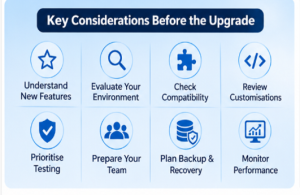
Prioritise Testing Before Deployment
Would you introduce a major software update directly into your production environment without testing it first? Probably not!
Testing helps identify potential issues before they affect everyday business operations. Organisations should create a dedicated testing environment that closely reflects their production setup. Some important testing activities include:
A structured testing approach helps minimise disruptions and improves confidence before deployment.
Prepare Your Employees and IT Team
A successful upgrade depends on technical readiness as well as user awareness. Administrators, developers, and employees should understand the changes introduced in the updated environment. For example, IT teams responsible for monitoring may need training on the Siebel Monitoring and Diagnostic Console. Businesses should arrange training sessions, prepare updated documentation, and communicate the upgrade schedule in advance. When employees understand the changes, adapting to the updated CRM environment becomes easier.
Create a Backup and Recovery Plan
What happens if something unexpected occurs during the upgrade?
A reliable backup strategy can help businesses protect important information and reduce operational risks. Before starting, IT teams should back up essential databases, configuration files, and other required components. They should also establish recovery procedures and verify that backups can be restored successfully. Having a clear rollback plan provides additional confidence throughout the deployment process.
Monitor Performance After the Upgrade
The upgrade process does not end when the new version becomes operational. Businesses must continue monitoring their CRM environment to ensure everything works as expected. The Siebel Monitoring and Diagnostic Console helps administrators track server health, resource utilisation, application activity, and system availability.
Regular monitoring can help IT teams identify unusual performance patterns, investigate potential issues, and maintain system stability.
Is Your Business Ready for Siebel CRM 26.10?
Before moving forward, review this quick checklist:
Addressing these points can make the transition more organised and manageable.

Final Thoughts
Upgrading to Siebel CRM 26.10 can help businesses improve product configuration, strengthen system monitoring, and enhance their existing CRM operations. However, achieving these benefits requires proper planning, technical assessment, comprehensive testing, and employee readiness.
At BriskWinIT Solutions, we understand the importance of reliable CRM systems, effective testing, and seamless technology upgrades. Our CRM, IT, automation, and testing expertise helps businesses navigate their technology requirements with greater confidence.
Frequently Asked Questions (FAQs)
Siebel CRM 26.10 is an Oracle release that introduces enhancements to product configuration and system monitoring, helping businesses improve CRM management and operational efficiency.
Key enhancements include API-Driven UI Property Management in Siebel Product Configurator and the Siebel Monitoring and Diagnostic Console (SMDC) for centralised system monitoring.
Businesses can benefit from improved product configuration management, better system visibility, and enhanced monitoring capabilities while supporting their evolving CRM requirements.
Yes. Functional, integration, regression, performance, and user acceptance testing help identify potential issues and ensure existing CRM functionalities continue working correctly.
Businesses should review their existing CRM environment, verify technical compatibility, assess customisations and integrations, prepare backups, conduct testing, and train employees.
SMDC provides centralised insights into system health, server performance, resource utilisation, and application activity, helping IT teams monitor their CRM environment and investigate potential issues.
Planning your next Siebel CRM upgrade? Explore more insights on CRM development, testing, and enterprise technology through our blogs. We would love to hear your thoughts and experiences!
 contactus@briskwinit.com